Setting Up AWS EKS Cluster with ALB Ingress Controller
The AWS Load Balancer Controller is a Kubernetes controller that manages AWS Elastic Load Balancers for your Kubernetes cluster. It replaces the legacy in-tree AWS cloud provider and offers better integration with AWS services, supporting both Application Load Balancers (ALB) for HTTP/HTTPS traffic and Network Load Balancers (NLB) for TCP/UDP traffic.
In this guide, we will walk through the setup process on your AWS EKS cluster.
Prerequisites
Before starting, ensure you have the following:
- A running AWS EKS cluster
kubectlconfigured for your cluster- AWS CLI installed and configured
eksctlinstalled- Appropriate IAM permissions to create policies and roles
Installation Steps
1. Install Helm 3
We will use Helm, the package manager for Kubernetes, to deploy the controller.
curl -fsSL -o get_helm.sh https://raw.githubusercontent.com/helm/helm/main/scripts/get-helm-3
chmod 700 get_helm.sh
./get_helm.sh
Helm simplifies the deployment and management of complex Kubernetes applications by packaging resources into a single chart.
2. Enable IAM OIDC Provider
This step is crucial for enabling IAM Roles for Service Accounts (IRSA), which allows Kubernetes pods to assume IAM roles securely.
eksctl utils associate-iam-oidc-provider \
    --region ap-southeast-1 \
    --cluster dev-cluster \
    --approve
This establishes trust between your EKS cluster and AWS IAM.
3. Create IAM Policy
Download and create the official IAM policy that defines the permissions the controller needs to manage load balancers.
curl -O https://raw.githubusercontent.com/kubernetes-sigs/aws-load-balancer-controller/v2.11.0/docs/install/iam_policy.json
aws iam create-policy \
    --policy-name AWSLoadBalancerControllerIAMPolicy \
    --policy-document file://iam_policy.json
This policy includes permissions to create, modify, and delete load balancers and related resources.
4. Create IAM Service Account
Bind a Kubernetes service account to an IAM role, enabling the controller pods to authenticate with AWS.
eksctl create iamserviceaccount \
  --cluster=dev-cluster \
  --namespace=kube-system \
  --name=aws-load-balancer-controller \
  --role-name AmazonEKSLoadBalancerControllerRole \
  --attach-policy-arn=arn:aws:iam::YOUR_ACCOUNT_ID:policy/AWSLoadBalancerControllerIAMPolicy \
  --approve
5. Deploy the Controller
Add the official EKS Helm repository and install the controller.
helm repo add eks https://aws.github.io/eks-charts
helm repo update eks
helm install aws-load-balancer-controller eks/aws-load-balancer-controller \
  -n kube-system \
  --set clusterName=dev-cluster \
  --set serviceAccount.create=false \
  --set serviceAccount.name=aws-load-balancer-controller \
  --set region=ap-southeast-1 \
  --set vpcId=vpc-YOUR_VPC_ID
The controller runs as a deployment with two replicas by default for high availability.
Verify Installation
Confirm the controller is running and has proper permissions:
kubectl get deployment -n kube-system aws-load-balancer-controller
kubectl get pods -n kube-system -l app.kubernetes.io/name=aws-load-balancer-controller
Check the logs for any permission errors or successful startup messages.
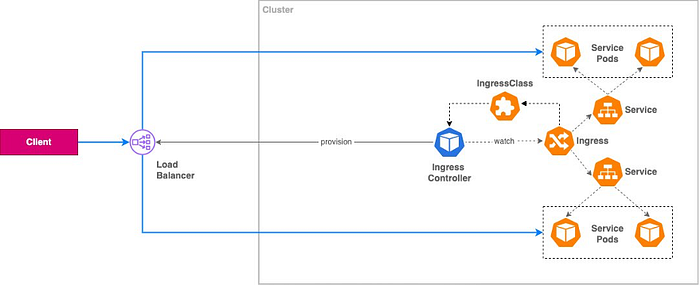
How It Works
Once deployed, the controller watches for Ingress and Service resources:
- When you create an Ingress with
kubernetes.io/ingress.class: alb, it provisions an ALB in AWS. - Creates target groups for your backend services.
- Configures routing rules based on your Ingress spec.
- Manages security groups automatically.
Key Benefits
- Automatic Provisioning: No manual ALB creation needed.
- Native AWS Integration: Leverages AWS APIs directly.
- Cost Optimization: Share a single ALB across multiple Ingress resources.
- Security: Integrates with AWS WAF and security groups.
This setup is essential for modern DevOps workflows, enabling seamless integration with CI/CD tools like Jenkins and containerized applications using Docker.