AWS CloudFront Hosting Toolkit: A New Solution for Static Sites
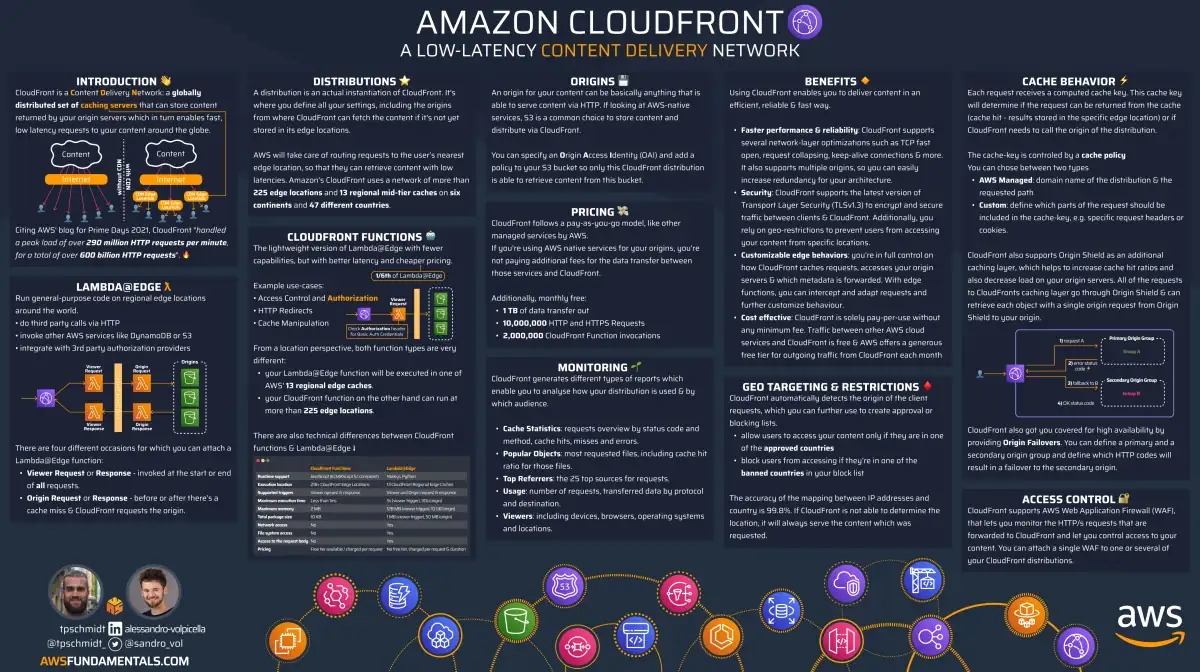
AWS offers many ways to host frontend applications. One of the most cost-effective and scalable ways is to host your static page on S3 and CloudFront.
In June 2024, AWS released a new tool to make this even easier: The CloudFront Hosting Toolkit.
In this post, we explore what this tool is, how it works, and how to use it with modern frameworks like React.
What is the CloudFront Hosting Toolkit?
The toolkit is a command-line interface (CLI) that sets up the required cloud infrastructure for you. It also creates a CI/CD pipeline and connects to your GitHub repository.
Typically, when you want to deploy your frontend to AWS, AWS Amplify is the first option you see. Amplify is great for getting started because it abstracts the infrastructure. However, as your project grows or customization needs increase, this abstraction can be limiting.
This is exactly why the CloudFront Hosting Toolkit was built: To give developers control over the infrastructure while automating deployment processes.
The toolkit aims to:
- Host static pages and single-page applications (SPA) on AWS.
- Provide an easy git-push deployment model (similar to Vercel or Netlify).
- Give full access to the infrastructure for customization.
Step-by-Step Frontend Hosting
Let's host a frontend application on AWS together.
Prerequisites
- AWS Account and CLI configuration.
- GitHub account.
- Node.js environment.
Installation
To initialize the toolkit, run the following command in your terminal:
npx @aws/cloudfront-hosting-toolkit init
This command will scan your project and suggest the appropriate configuration.
Infrastructure Provisioned
The toolkit creates the following components in the background:
1. S3 and CloudFront
Your static files (HTML, CSS, JS) are stored in an S3 bucket and delivered globally via CloudFront (CDN) for low latency.
2. Key/Value (KV) Store
The CloudFront Hosting Toolkit uses CloudFront's KeyValueStore feature to enable atomic deployments. Each deployment gets a unique ID (e.g., Git commit hash). The KV store keeps track of which version is live.
This ensures that your users always see the latest and consistent version of the application. Caching issues are minimized.
3. Step Function
An AWS Step Function is created to orchestrate the deployment process. This function:
- Updates the KV store with the new version.
- Purges old deployments from S3 (optional).
4. CI/CD Pipeline
A pipeline is set up that triggers on every change in your GitHub repository:
- Source: Pulls code from GitHub.
- Build: Compiles the application and uploads to S3.
- ChangeUri: Triggers the Step Function to update the live version.
Summary & Honest Opinion
The CloudFront Hosting Toolkit is somewhat of an "L3 CDK Construct" for us. It provisions infrastructure with sensible defaults but, unlike Amplify, allows you to fully tweak and enhance this infrastructure.
Pros:
- Can be integrated with CDK.
- Full control over infrastructure.
- Vercel-like easy deployment experience.
Cons:
- Still new, so there are some rough edges (e.g., documentation gaps regarding
next export). - GitHub app permissions sometimes require manual intervention.
If you've hit the limits of Amplify but don't want to write your own CloudFront + S3 + Pipeline setup from scratch, this toolkit is a great middle ground.
Frequently Asked Questions (FAQ)
1. Is this toolkit free?
The toolkit itself is open source and free. However, you pay for the AWS resources it creates (CloudFront, S3, Step Functions, etc.).
2. Which frameworks does it support?
It supports popular SPA frameworks like React, Vue, Angular, and static site generators like Next.js (static export).
3. Why use this over Amplify?
While Amplify offers a black box, this toolkit gives you the infrastructure code (CDK or CloudFormation) and control. It is more suitable for complex and customized architectures.
For more information, check out our AWS Consultancy or DevOps Consultancy services.
Source: https://awsfundamentals.com/blog/cloudfront-hosting-toolkit