The Keyless Cloud: Implementing Workload Identity for GKE and Cloud Run
One of the biggest risks in cloud security is mismanaged credentials. Traditionally, long-lived Service Account keys (JSON files) were used for applications to access Google Cloud APIs. However, leakage of these keys can lead to serious security breaches. In this article, we will explore how to eliminate this risk by using Workload Identity on Google Kubernetes Engine (GKE) and Cloud Run.
Why the 'Keyless' Approach?
Many DevOps engineers struggle with managing service account keys in CI/CD processes (such as Jenkins or GitLab CI) or application deployments. These keys:
- Require rotation.
- Can be forgotten on developers' machines.
- Can be accidentally committed to git repositories.
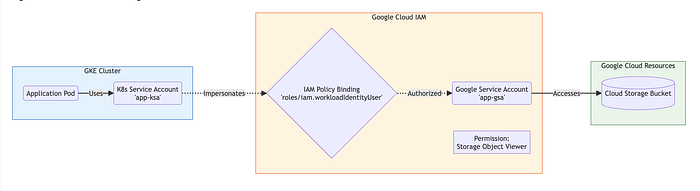
Similar to the IAM Roles for Service Accounts (IRSA) concept in the AWS world, Google Cloud offers Workload Identity. This method binds Kubernetes service accounts to Google Cloud IAM service accounts, allowing your Docker containers to access Google Cloud resources without any key files.
How Workload Identity Works
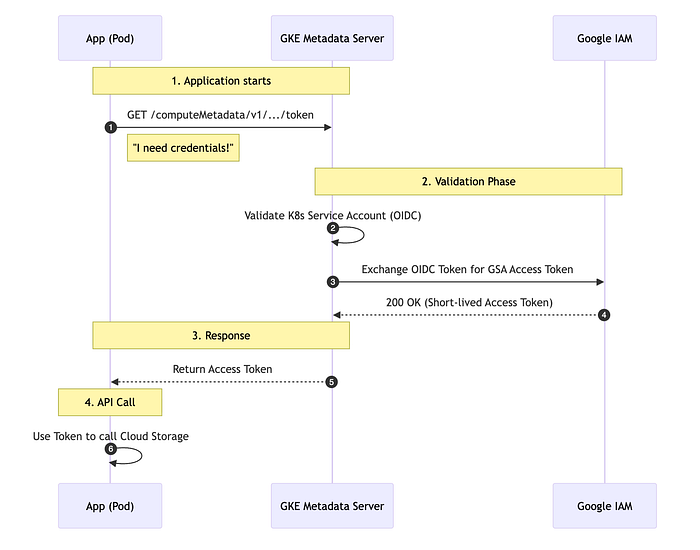
Workload Identity establishes a trust relationship between a Kubernetes Service Account (KSA) in your GKE cluster and a Google Cloud IAM Service Account (GSA). The application inside the Pod authenticates via the GKE metadata server and receives temporary access tokens.
Implementation on GKE
-
Enable Workload Identity: You need to enable this feature when creating or updating a cluster.
gcloud container clusters update my-cluster \ --workload-pool=PROJECT_ID.svc.id.goog -
Bind IAM Policy: Grant the IAM Service Account permission to be impersonated by the Kubernetes Service Account.
gcloud iam service-accounts add-iam-policy-binding GSA_NAME@PROJECT_ID.iam.gserviceaccount.com \ --role roles/iam.workloadIdentityUser \ --member "serviceAccount:PROJECT_ID.svc.id.goog[K8S_NAMESPACE/KSA_NAME]" -
Annotate Kubernetes Service Account:
kubectl annotate serviceaccount KSA_NAME \
  --namespace K8S_NAMESPACE \
  iam.gke.io/gcp-service-account=GSA_NAME@PROJECT_ID.iam.gserviceaccount.com
Once these steps are completed, similar to Pod Identity on EKS, your pods can now securely access Google Cloud APIs (such as Cloud Storage or BigQuery) directly.
Cloud Run and Workload Identity
For Cloud Run, the process is even simpler. While your Cloud Run service has an identity by default, best practice dictates creating a specific Service Account for each service.
gcloud run deploy my-service \
  --image gcr.io/project/image \
  --service-account my-service-account@project.iam.gserviceaccount.com
This ensures your application adheres to the Principle of Least Privilege, having only the permissions it strictly needs.
Conclusion
Managing static keys is both an operational burden and a security risk. By using Workload Identity on GKE and Cloud Run, you can eliminate this burden and bring your infrastructure up to modern security standards.