Stop Fighting YAML: Build Docker Compose Files Visually
If Docker Compose keeps tripping you up, it is rarely because you do not understand containers. It is because Compose makes you juggle two things at once: YAML rules and Docker's schema. One missing space, one wrong indentation level, one value that YAML silently retypes, and your "quick local stack" turns into a half-hour of error messages.
This is exactly the kind of friction that makes Docker feel harder than it needs to be.
When you write a compose file, you are not only describing services. You are also writing YAML, and YAML is strict in ways that punish small mistakes. People run into this constantly, especially when they copy a snippet and shift indentation without noticing. Even experienced developers still get bitten by "unsupported config option" style errors that turn out to be indentation issues, because YAML structure is determined by whitespace.
Why Visual Compose Editing Works So Well For Beginners
A visual editor changes the workflow in a very practical way. Instead of "type YAML, run, fail, scroll error, edit YAML, run again," you build the same configuration using a UI that knows what a service is, what a network is, what a volume mount is, and which fields are missing.
The most common Compose mistakes are not advanced DevOps problems. They are small configuration mismatches that a UI can catch early, like missing required fields, undefined references, or duplicate names.
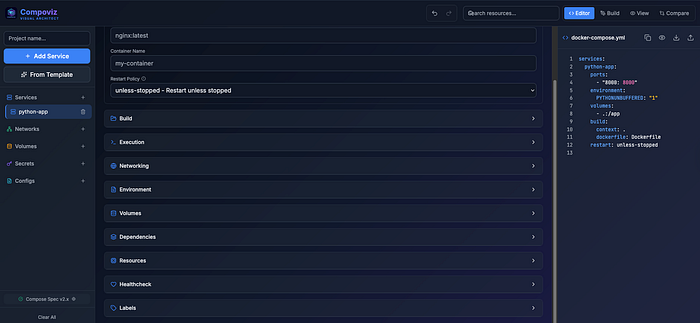
That is the core promise of Compoviz: it is an open-source, web-based visual architect for Docker Compose that turns YAML into interactive architecture diagrams, and lets you edit your stack through a structured service editor instead of raw indentation.
It Treats Your YAML Like A Diagram
Compoviz positions itself as "Docker Compose Architect" for a reason. The tool is designed to transform a compose file into a diagram that is actually useful, not just a pretty visualization. It automatically generates architecture diagrams using Mermaid.js, groups services by Docker networks, and even visualizes depends_on conditions like healthy and started as labeled connections.
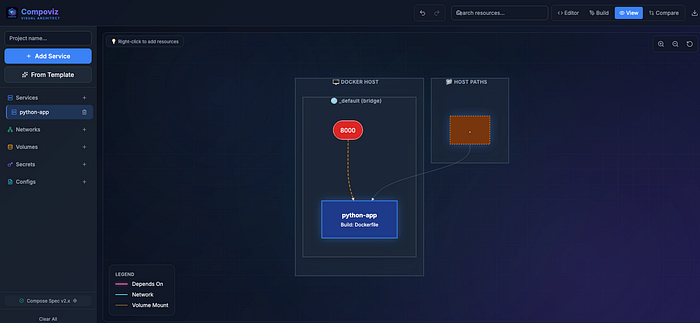
A compose file can be readable when it is small, but the moment you have a database, an app, a reverse proxy, a queue, and some background workers, your brain starts doing graph work. Compoviz simply makes that graph explicit.
On top it also surfaces infrastructure details you typically have to scan for manually, like host path mounts, named volumes, secrets, and configs. This clarity is essential whether you are deploying locally or preparing for a Kubernetes migration.
The Feature That Can Save You Hours: Conflict Detection Across Projects
Here is one of the most underrated sources of Compose pain: collisions.
If you run multiple stacks locally, you will eventually hit a port collision, reuse a container name by accident, or mount the same host folder in two different projects and wonder why state is weird. This is not theoretical. Port binding issues are common enough that entire troubleshooting guides exist just for "port is already allocated" style errors.
Compoviz tackles this head-on with multi-project comparison. It can load up to three different compose files at the same time and detect collisions such as port conflicts, duplicate container names, and shared host volumes in real time.

Compose Spec Compliance Without The "Version" Confusion
If you learned Docker Compose from old tutorials, you probably saw version: "3" or version: "3.8" at the top of every file. The Compose ecosystem has shifted toward the Compose Specification, and Compoviz explicitly calls out that it is built for the modern spec and avoids the old "version header" habit.
This is a small detail that makes the tool safer for newcomers. You spend less time copying outdated templates and more time producing a compose file that behaves the way current Docker tooling expects.
Your Workflow is Straightforward
You bring in your current compose file by pasting YAML, or you start from scratch. Compoviz immediately turns it into a diagram, grouped by networks, with dependency edges you can see. Then you switch into editing mode, where services become structured forms instead of raw text.
Compoviz provides real-time warnings for common schema issues such as missing images, undefined network references, and duplicate resource names.
It also supports the areas that tend to cause the most "tiny mistake, huge confusion" pain: environment variables, .env usage, healthchecks, entrypoints, and user permissions.
And because you still need the YAML at the end, Compoviz exports clean, optimized YAML that you can drop into your repo. Whether you integrate this into your Jenkins pipelines or use it to deploy to AWS EKS, having a clean base is crucial. It also pairs well with Terraform workflows where infrastructure is code, but application definitions live in Compose or manifests.
Visual Editing Does Not Replace Validation
Even with a good visual editor, you still want a simple "trust but verify" step in your workflow, especially if you are learning.
A reliable way to validate a compose file is to render and check it using docker compose config. This catches a lot of structural and schema-level issues before you attempt to run the stack.
If you treat Compoviz as the builder and docker compose config as the gate, you get a setup that feels almost unfairly productive for newcomers: build visually, export YAML, validate, run.
How To Run Compoviz Right Now Without Installing Anything
Compoviz has a live demo linked from the repository, so you can use it in the browser immediately (https://www.compoviz.pro/).
That is the easiest onramp if your goal is simple: turn an existing compose file into a diagram, spot problems, and export a cleaned-up version.
If you later decide you want it locally, the project is designed to be self-hosted.
The Best Way To Learn Compose With Compoviz Without Getting Overwhelmed
If you are new to Docker Compose, the fastest learning loop is not memorizing keys. It is building small stacks and watching how the pieces connect.
You start with a two-service setup, like an app and a database. In Compoviz, the diagram makes "these two containers talk over a network" obvious, which helps you internalize what Compose is doing for you. Then you add a volume mount and see how storage becomes part of the architecture. Then you add healthchecks and dependencies and see those edges appear.
When you export the YAML, you get a file that you can still read and learn from. The difference is that you learn from a correct example you produced, not from a broken file you copy-pasted and then spent an hour repairing.
A Simple Habit That Makes Your Compose Files Bulletproof
Even with Compoviz, you want one final step before you commit anything.
After exporting, run:
docker compose config
This gives you a rendered, validated view of the file and surfaces errors early. It is one of the simplest sanity checks you can add to your workflow.
If you do that consistently, Compose stops feeling fragile.